
Spreadsheet Sentry FAQ
Who is Spreadsheet Sentry for?
Are there limitations to what can be done with an encoded spreadsheet?
How do I activate my Spreadsheet Sentry software licenses?
Which formula encryption mode should I use?
What about the technical details?
What are the system requirements to use Spreadsheet Sentry?
What are the license conditions?
Who is Spreadsheet Sentry for?
Spreadsheet Sentry may be used by practically anyone who uses Microsoft Excel® for applications with valuable intellectual content, including:
- small - medium sized businesses
- large corporate entities
- companies of all disciplines and types
- businesses with representatives away from the office
- companies providing demonstration software to the public
- individuals or organizations developing spreadsheet software for sale
Why would someone want to use Spreadsheet Sentry?
There are many reasons, the main one being a new level of peace of mind, but here are just a few others:
- to protect their proprietary spreadsheet algorithms
- to secure their intellectual property
- to secure use within an authorized environment
- to prevent "transfer" of core methodologies to competitors
- to maintain a market edge due to trade secrets embodied in spreadsheet formulas
- to use Microsoft Excel® oriented Information Rights Management (IRM) capability without relying on the Microsoft Windows Rights Management Service in Microsoft Office 2003 Server, or other similar 'corporate' IRM products
Are there limitations to what can be done with an encoded spreadsheet?
Spreadsheet Sentry is primarily intended for spreadsheets that have been tested and debugged (referred to as "mature" spreadsheets).
While the data in a spreadsheet encoded by Spreadsheet Sentry can be updated, other modifications to the encoded spreadsheet are intentionally limited, in order to maintain integrity of the calculations and security of the intellectual property.
But you can still make modifications, corrections and improvements to the original (unencoded) spreadsheet, which may then be re-encoded for general use.
Performance or other limitations may be experienced when Spreadsheet Sentry is used for:
- very large spreadsheets
- highly complex spreadsheets
- spreadsheets with calculation routines requiring significant iteration
However, even these types of spreadsheets can still be successfully encoded using the advanced Spreadsheet Sentry options, either individually or in combination, by:
- encoding just some of the worksheets
- encrypting just a percentage of the formulas
Note that formulas with external references are not encrypted by Spreadsheet Sentry. This allows Microsoft Excel® to update links to remote data sources as usual. Also, cells with long formulas (more than approximately 230 characters), and some forms of array and label formulas, are not encrypted.
How do I activate my Spreadsheet Sentry software licenses?
It's easy! Using the License Manager program supplied with Spreadsheet Sentry, all you need to do is email us the identifier displayed for your PC, and we will email you back the required Activation Key - all within minutes!
Activations are specific to each licensee and to each PC, which prevents, for example, Company A from using Company B's encoded spreadsheets. It also prevents an otherwise authorized user from copying an encoded spreadsheet and using it at an unauthorized location.
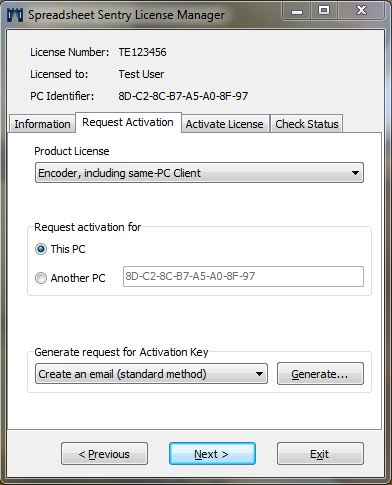
An activation password is required in order to generate a valid activation request. We provide a master activation password at time of purchase, and on request can also supply a set of one-off passwords that are good for activation of only a single PC. This gives you strong control over who can activate one of your Client licenses.
Which formula encryption mode should I use?
Spreadsheet Sentry has two formula encryption modes, selectable from the Encoding Options screen:
- Lockdown Mode
- Visible Precedents Mode
If formulas are encrypted using Visible Precedents Mode, users can view (and update) any precedent cell addresses. This has the advantage that users can make structural changes to the spreadsheet, such as inserting or deleting columns, moving formulas, and renaming sheets. Even after such changes, Visible Precedents Mode encrypted formulas will correctly calculate.
If you do not want users to see what precedent cell addresses are used by the encrypted formulas, then you should use Lockdown Mode. However, a disadvantage to this mode is that in general structural changes should not be made to the spreadsheet, as the encrypted formulas will not automatically update to take care of changed row and column addresses, for example. In order to discourage users from making structural changes, the Encoder will apply standard Excel sheet protection to all used worksheets (using the workbook protection password on the Encoding Options screen) if Lockdown Mode is used for formula encryption.
What about the technical details?
While Spreadsheet Sentry has been designed with a simple and intuitive interface, underneath lies a highly sophisticated and powerful encoding engine.
Spreadsheet Sentry incorporates the following:
- the powerful and widely accepted Advanced Encryption Standard (AES)/Rijndael encryption algorithm
- strong 128 bit encryption
- unique company-specific encryption cipher key for each spreadsheet
- multiple encryption layers
Spreadsheet Sentry encodes formulas at cell level. This means:
- each formula is individually encrypted, i.e. each formula is individually and independently converted into an apparently random character array format which is meaningless to users, and cannot feasibly be decrypted to uncover the original formula
- encryption (or otherwise) of any cell or range of cells does not affect any other cell or range. In other words, if some cells are left unencrypted, these do not compromise the integrity of those cells which are encrypted
- if just a portion of cell formulas provide the core calculation capability (and hence intellectual property content), only this portion needs to be encrypted
What are the system requirements to use Spreadsheet Sentry?
The following are the system requirements for the use of Spreadsheet Sentry:
- Operating system: Microsoft Windows® 2000 and later
- Microsoft Excel® 97, 2000, XP, 2003, 2007, 2010 or 2013 (64-bit versions of Office not yet supported)
- Processor speed, RAM, and hard disk capacity - as for normal Microsoft Office
- For using an encoded spreadsheet with the Spreadsheet Sentry Client, RAM demand is only slightly higher than that required for the original (unencoded) spreadsheet
- For encoding large spreadsheets with the Spreadsheet Sentry Encoder, temporary RAM demand can be noticeably higher than the file size of the spreadsheet
What are the license conditions?
Click here to read the End-User License Agreement.
How do I get started?
Download Spreadsheet Sentry Personal - a fully functional version of Spreadsheet Sentry including an Encoder and Client, except that encoded spreadsheets can only be used on the same PC that they were encoded on.
Order Spreadsheet Sentry now - a full version of Spreadsheet Sentry, including (usually) one Encoder license and as many Client licenses as you need to run your encoded spreadsheets.